Projects » wpSearchMu
wpSearchMu enables sitewide search over an entire WordPress Mu installation. It is an offshoot of the excellent wpSearch plugin, just extended to work for Mu instead of only ‘normal’ wordpress.
wpSearchMu replaces the default WordPress search with the open source Lucene search engine. This allows unparalleled result accuracy for your blog. With wpSearchMu, you can specify settings on a per blog level. This means that your root blog can be setup to search the entire Mu site, while each individual blog can be set up to search only itself (or any combination of blogs).
Current Version: 2.1.2
Download it here:
Download It Here
More Info and Source Code
I just set up a repository at the generous wordpress.org site. Check out the wpSearchMu page for more info.
To download the source for your hackering pleasure, just type:
[code lang=”shell”]
svn co http://svn.wp-plugins.org/wpsearchmu wpsearchmu
[/code]
Installation
- Upload the wpSearchMu zip to your mu-plugins directory and unzip it. You should be left with a wp-search-mu.php and a wp-search-mu directory in the mu-plugins folder.
- Next, you’ll need to configure your search index options, and then build the full search index. Building the index may take a few minutes but you should rarely need to do this more than once.Also, so that Lucene can create the search index, you’ll need to set the permissions of the wpsearchmu directory to full permissions. From the root directory of your WordPress installation:
[code lang=”shell”]
chmod -R 777 wp-content/mu-plugins/wp-search-mu/
[/code] - After that, you’ll want to update your search.php to work with wpSearchMu’s search results.
Theme integration
You’ll need to update your search.php to work with results from more than one blog. At the beginning of the Loop, add:
[code lang=”php”]
switch_to_blog($post->blog_id);
[/code]
and at the end, add:
[code lang=”php”]
restore_current_blog();
[/code]
After your done, your search.php should look something like:
[code lang=”php”]
while (have_posts()) : the_post();
switch_to_blog($post->blog_id);
?>
<h2><a href="<?php the_permalink() ?>"></a></h2>
<div class="entry">
<a href="<?php the_permalink() ?>">Read more…</a></div>
restore_current_blog();
endwhile;
?>
[/code]
Also! If you’re using the Thematic framework for your theme needs, and don’t want to edit the search.php file directly, Adam Warner has a great write up describing how to get it working for Thematic child themes.
Also! If you want to query the index outside of the normal WordPress search.php file, then you can do that too! Have a look at the following code for how to query the search index of a particular blog.
[code lang=”php”]
// switch to the blog who’s index you want to use
switch_to_blog(3);
$index = wpSearch_createIndexObject(false);
$s = "my search terms";
// get the results from the lucene index
$lq = "post_title:($s) post_content:($s) post_name:($s)";
$query = Zend_Search_Lucene_Search_QueryParser::parse($lq);
$hits = $index->find($query);
// interate over the results
// and output some HTML
$posts = array();
$count = 1;
foreach($hits as $hit){
$post = WPSearchResult::BuildWPResultFromHit($hit);
$posts[] = $post;
the_title();
echo "<br>";
}
restore_current_blog();
[/code]
Before and After
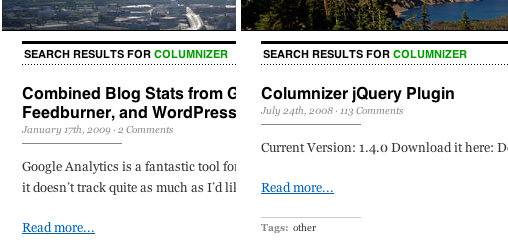
Search accuracy was dramatically increased after installing wpSearchMu. Below is a sample screenshot showing the top result for searching my blog for “columnizer”. Default WordPress search on the left links to an unrelated post. The results on the right show wpSearchMu correctly linking to Columnizer’s project page.
wpSearchMu Settings
Below is a summary of all the available options for wpSearchMu.
1. Index and search only want you want.
you can setup wpSearchMu to index every blog in your Mu install, or only certain blogs. You tell it to search only a specific list of blogs, or everything except a certain list of blogs.
2. Boosting / Weighting
‘Boosting’ one field higher than another will make that field more important in searches. Usually, the title is the most important thing to match in a search, but that’s up to you. Setup field weights to match what you think is important. You can setup custom weights not just for the title and body of a post, but for custom fields as well! Which brings us to…
3. Searching comments
One pitfall of WordPress’s default search is that it doesn’t also search comments. With wpSearchMu, you can optionally index all comments as well, not just posts and pages.
Wishlist
1. Searching custom fields
Have any important data tucked away in custom fields? I do! that’s why I extended wpSearchMu to include the ability to search custom fields.
FAQ
1. Why wpSearchMu?
wpSearchMu stands apart from Google CSE, OneSearch, and others, in that it’s based on the open source Lucene search engine, which yeilds much more accurate results compared to OneSearch. Unlike the Google search, it’s 100% tweakable, customizable, and doesn’t show unwanted mandatory ads.
2. What’s Lucene, and what’s a search index?
Lucene is an open source search engine/platform/framework that lets you index and search just about any data you put into it. A search index is just that, an index! like at the back of a book that lists the pages each word is on, Lucene’s index lets you quickly get the post, page, or comment from a given search query.
3. Can I index only certain blogs?
wpSearchMu lets you index all, some, or just one of the blogs in your Mu site. You have complete control over which blogs are included in your search index.
4. Can wpSearchMu be installed on just the root blog? or does it have to be installed on every blog?
The wpSearchMu plugin can be activated on any and every blog in the Mu installation, not just the root blog. You have complete control over which blogs wpSearchMu is activated on.
Not only that, but for each blog that wpSearchMu is installed on, the blog owner can decide which blogs to include in it’s search results. This means that, for every blog on the site, search results on their blogs search page to return results just from their own blog, or from some subset of blogs, or from every blog in the system.
As an example, I’ve installed wpSearchMu on my root blog and set it up to return results from the main blog and from /notes/. I’ve also setup the /bookmarks/ blog to only search bookmarks. Both of these searches are powered by wpSearchMu.
Changelog
For a complete list of what’s changed in each version, check out the full changelog.
Going to try this now!!! I hope it works!!
THANKS!
LK
Just found a pretty sizable bug that i’m not sure how i missed the first time around. I updated the .zip download with the fix, so re-download and re-index and you should be good to go.
cheers 🙂
Hey Adam, I must say this is great work!!
Is there any chance that you will be adding categories into the search features?
Thanks,
LK
I have had a difficult time searching with this plugin. I have not been able to get any search results. I have installed properly but I get empty result sets. I have re-indexed, re-installed but still am not getting any search results. I have 15 blogs on my install do I need to do theme integration on each of them? I’ve tried integrating on two of them and still have no results. Please advise.
@O
make sure your directory is chmod’d to 777 and that the index directory exists. you should see the following directories when you re-index a blog:
wp-content/plugins/wpsearchmu/data/blog_id
Hey Adam, after playing around with the search a little more it seems that I can not search with a authors name. I looked into the code and it seemed like that it should be able to do this.
I tried adding
$author_query = “post_author:($q)”;
to the query function but that didn’t seem to help. If you have any comments / ideas that would be great.
Thanks,
LK
@Adam Wulf
Ok I started from scratch: I installed, then 777’d then I went to my first blog and indexed. The data file showed up. I thought that this would index all of my blogs at once? I then went to a second blog and did the same and got the data file (with 4 files inside). As a test I copied one of the titles from the blog and got an empty result set. I then searched “hello world” which is in all of my blogs and again nothing!
Oh and yes, Dr. Antinori is really creepy!
Landy,
i’m pretty sure it’s indexing the author id instead of the author name, so searching for a name isn’t matching. i’ll put that on my todo list, along with category search.
O,
strange that you only have 4 files, i get 11 files in my index… something’s going wrong during the index apparently. i’ll poke around with it tonight/tomorrow and try and reproduce what you’re seeing. any other plugins, especially search related plugins, installed?
yes I have “one search” in my mu-plugins folder which I just removed. Every step is going well until I actually execute a search.
the files I see are:
write.lock.file
segments_1
segments.gen
read.lock.file
Any thoughts anyone?
O, I’ll should have an update late tomorrow. i had hoped to get it done this weekend, but travel + errands took up too much of my time :/
Simply the Best – users delight.
While it seems to work – ie. it has properly rendered the authors and the list of posts. For example on my site if you search for “wordpress” (from homepage)- there are four posts that pop up – which is correct as can be viewed from the name of authors – HOWEVER – the LINKS are WRONG. What is the remedy?
Sorry to write again – but is it necessary to write the two lines in the search.php – is it for proper links or is it for theme integration only?
Also, where is this search.php ? Is it a theme file or a regular wordpressMU file?
thanks
Thanks!
O, i just uploaded a new version. this one installs in mu-plugins instead. also be sure to deactivate any other search related plugins. lmk how it goes!
indiapoint, the links are wrong b/c your search.php isn’t updated. the search.php /must/ be updated for the links to work. look in your theme’s directory and you should see it.
Cheers!
Thank you for the update. I have installed and still am not getting results. I am still getting the same 4 files:
read.lock.file(file size: 0)
segments.gen(file size: 20)
segments_1(file size: 20)
write.lock.file (file size: 0)
The dialog tells me:
Rebuilding index with comments … Complete
wpSearchMu is properly configured and indexed. All searches on this blog use wpSearchMu instead of the regular WordPress search.
But when I search for a title that is in that blog no results. I have deleted any other search file out of the mu-plugins folder.
The issue seems to be that “if (have_posts())” always fails in the search.php and my “get_header()” is returning NULL. This only happens if I turn on wpSearchMU. Do you have any clues as to why this is?
O, change KLogger:OFF to KLogger:DEBUG in wpSearch.php, then look at log.txt to see if anything looks suspicious.
Also, confirm that “is_search() && wpSearchIsIndexBuilt()” is true on line 189, and that the search is actually being run against the index.
I’m new to WPMU, not new to WP.
Though I must be daft because I can’t figure out how to build the initial search index options. I’m probably overlooking something very simple!
Any help here?
Ray, in the Settings -> WP Search Mu screen, enter the blog ids that you want to index (or leave empty to index the entire site), then click the checkbox next to Build Search Index and optionally next to Enable Comment Searching. Then click Save Settings at the bottom.
It’ll take between a few seconds to a few minutes, depending on the size of your site, and then you should see a “wpSearchMu is properly configured and indexed” message at the top of the screen.
Hope that helps!
Hi Adam,
Thanks for those easy instructions. I was looking for wpSearchMu under “Site Admin”, instead of the regular “Settings” menu.
I still have some ways to go before I’m up to speed with MU!
Follow-up questions for you.
If I do not update the “search.php” file, that means MU will still use the default WordPress search right?
I think I might use a select option dropdown for the search, so that users will have the option to search the blog they are currently on or the entire site.
If I were to do such an option, I’d probably have to edit the searchform.php file.
Is there some type of PHP code I could use on the searchform in order to let wpSearchMu distinguish the type of search?
A hidden input value perhaps?
I’m not sure if this is possible.
Thanks for reading!
Hi there,
It looks so promising… the only thing is i don’t get any results… installed it, chmod the folder to 777, saved the settings. working with wpmu 2.7.1, I activated the wpSearchMu only at main blog. I think its indexing only the main blog, which in my case is empty. any idea what could be the reason ?
After some more checking… the index is always empty… (i can see the files at “/data//”
but all files are empty… (the folder & even the files are 777)
Fabulous plugin…thanks very much.
I also had an issue where no search results were displayed, but my blogs were all set to be private…making them public resolved it (well, removing the line that required public blogs to be returned did!)
Was wondering if the author search was coming along 🙂
-pc.
Paul, good catch on the public/private blogs. hopefully that’ll help out Sahar and O. Let me know guys if this works for you?
about author search… it’s on my list, but I’m swamped right now with work. I’ll get to it but don’t hold your breath 🙂 although, I’m accepting .patch files if you want to build in author/category search… 😉
Ray
you have to modify the search.php files, otherwise the links will be pointing to the wrong place in the search results. To toggle between wpSearchMu and the default search, you can delete the search index in the plugin settings page. It’ll tell you at the top of the settings page which search is being used.
as far as the option to search the one blog vs entire site, I don’t think that’s possible right now, but its a great idea for something to add.
Hןi Adam,
well…. all my blog are public (nonarchived/spam/mature/deleted) 🙁
Can’t find yet why the index remain empty…
Finally found what it was….
i entered for ‘Blogs NOT to Index’ the main blog (which also was the only one public = 0 ….
But…. now downside… search isn’t working with other chars than english (like, Chinese, Arabic, Hebrew….)… any idea why ?
I’m getting a weird issue with indexing. When I install and index whole site, the search results seems to ignore the blog name.
So on blog /art I might have an article with url example.com/art/story.
If I search in the top level blog the search results appear as: example.com/story. If I search on a different blog (/travel), the link to story in search results appears as: example.com/travel/story.
Needless to say I only get the correct url to a story if I search for it in the blog it resides in (example.com/art/story).
Why is it skipping the blog name in the search results URL?
I should also mention I’m using WordPress Mu 2.7.1. Thanks for any help you can offer.
Maybe also mention that I use custom permalinks (%year%/%month%/%day%/%postname%/).
Search is ok for pages but not posts. Pages use permalink (/pagename/) but search results show for example: /?page_id=22.
Steve, you need to update your search.php template file
Thanks for your help. I did that but I was still getting the same results. But you pointed me in the right direction!
I was using the Thematic theme and the search loop is buried in /library/extensions/content-extension.php. The loop was calling the function thematic_postheader(). I put the theme search integration in that function and it worked!
Thanks for your help. Love this search tool. Well done.
Steve, glad you got it working! 🙂
I implemented it at
http://indiapoint.net/site/
However, it seems that it doesn’t search pages (?)
How to make it search pages?
thanks
Yes it searches pages as well – I didn’t test it fully earlier.
Very nice indeed.
The site is not fully completed – but the mu search works from:
http://indiapoint.net/site/
(I didn’t add the plugin in the muplugin folder, but in the plugin folder – it still works fine)
Had been trying to implement it in a sensible manner – found that under normal conditions (even when implemented properly) it would break links in “recent posts” widget (bug perhaps?)
So had to find some ingeneous manner of implementation !
many thanks
Does anyone knows why Chinese, Arabic, Hebrew indexing isn’t working ? (no results with wpSearchMu while one search shows the results)
@sahar, I’m not sure why non-ascii characters aren’t showing up correctly. I probably won’t have time anytime soon to fix it, but…. .patch files are welcome! 🙂
I have found that I have to rebuild the search index everytime. The index does not rebuild automatically.
http://indiapoint.net/site/
Whenever an articles is posted – it does not automatically show up on the site search. It is only when the search index is rebuilt that the new post/page come up on the site search.
@indiapiont, you need to put wpsearchmu into the mu-plugins folder so that wpsearchmu is activated on all blogs. this ensures that any updates to those blogs will update all appropriate search indices. If it’s not activated for a blog, then updates to that blog won’t show up in any index.
Any chance of upgrading this? It isn’t working under 2.7.1.
Thanks, it works now *perfect* (WPMU2.7.1).
I have put it in the plugin folder and also put the folder in muplugin folder. And I activated it sitewide from the installed plugin option.
Dont know which one is working – but its working fine. Thanks a lot!
Hi Adam,
Let’s say I have more than a couple blogs, and I somehow want to mass-adminster those blogs for wpSearchMu.
Is there a way to go about this, instead of manually going into each blog to configure wpSearchMu?
@Ray, I’ll add that to the top of my todo list for this plugin. Great idea!
Does it also work with WordPress 2.8 (non-MU) ?
Btw the version on this site is newer then in WordPress`s archive. That one features 1.0.0
Hey Ramoonus,
This is wpSearchMu, not wpSearch 😉
Try wpSearch for WP Standard:
http://wordpress.org/extend/plugins/wpsearch/
The instructions here say to put it in mu-plugins, but the instructions on here say to put it in plugins?
http://wordpress.org/extend/plugins/wpsearchmu/installation/
Also, in your directions you say to chmod 777 this dir: wpsearchmu.
I think this should be wp-search-mu?
@Klark,
correct install is to put it in mu-plugins. i’ll update the documentation on wordpress.org to reflect that. thanks for the heads up 🙂
Thanks. I tried installing it, but kept getting errors when creating the index. I think it’s related to mbstring not being installed, so i need to look into getting that enabled.
Regarding the mu-plugins folder:
Plugins places in the mu-plugins directory will not show up in the Plugins menu.
Therefor it must stay in the plugins folder for activation.
Is there any changelog (online) for the new update?
@IndiaPoint, I’d forgotten to add the link last night, so I just added a link to the changelog just below the FAQ
@Sahar, plugins in mu-plugins are automatically activated for all blogs in the system. the plugin has to be added to mu-plugins, or manually activated for every single blog, so that it can properly update it’s index when any post on the site is added/edited.
You’re correct in that it won’t show up in the plugins menu, but it’s still activated on all sites. You should see the options page in the settings section of the admin sidebar.
Cheers!
Hey Adam,
Great work there. And, a great plugin. Got it and installed it perfectly.
I just have a little problem with this though. I am trying to search for ‘tags’ and am unable to do so. Is there any way to do it out of the box?
Else, I would try to extend your work to make this happen. Any pointers for that would be helpful.
Cheers,
– Adhip.
Adam, thank you for this plugin. As mentioned above, I got confused for a while when I saw the plugin readme still has uploading to plugins folder instead of mu-plugins per your webpage. I decided to follow your instructions on this site and I was able to index the WPMU site 🙂
For this specific WPMU install which is for a religious organization, when I input either Fr. Sebastian or “Fr. Sebastian” (with quotes) I get a list of all priests in the site like Fr. Charles, Fr. Ramon, Fr. Gary etc. etc. How can I make it I forgot the term, where search results should include all text input in searchbox?
While just typing Sebastian gets the correct results (just great), I am sure that there will be those who will input Fr. Sebastian.
Having said all that, thank you for this plugin 🙂
Thank you.
This made my day. Works perfectly (WPMU 2.8.1). I can’t believe sitewide search still isn’t part of core wpmu…
One quick suggestion: you only need to create a ‘data’ directory inside wp-search-mu/ and then only chmod “data” to 777. Maybe you could even include an empty ‘data’ directory by default. I don’t generally like to chmod 777 things that don’t need it. 🙂
@mercime, I honestly haven’t taken too close a look at the search syntax. After a bit of poking around, it looks like you’re query would have to be “Fr. AND Sebastian”, which I agree isn’t terribly intuitive. I’ll put this on the list to clean up, thanks for the heads up.
@Jon, great tip! I’ll update the instructions for the next release to mention that.
works perfectly as advertised!
Add me to the list of those that would love to see the results categorized by site name and type.
Meaning on my main blog I have this installed to search all other blogs.
would love to see a results page, that would separate out the results via the site they were found on.
example:
search for ‘candy’
results would be
site: candylovers
— posts
—–results
—–results
–tags
—–results
—–results
–comments
—–results
—–results
site:chocoholics
— posts
—–results
—–results
–tags
—–results
—–results
–comments
—–results
—–results
etc…. would be a nice way to organize the returned results imho
btw
would also be really cool if it could search buddypress fields such as groups/wires/forums/users etc…
With automatic behind buddypress now, I”m guessing it will become almost mainstream for wpmu as it matures.
Hey Adam,
Quick Update: I was able to extend the search to search for the tags in the posts really easily and it worked like a charm.
Great coding on the plugin to make it that easy to extend! 🙂
Cheers,
– Adhip.
This doesn’t work with the Thesis theme any ideas?
Really like this but when you click update indexes the bottom left corner has an error for java and says not compatabile (or something similar) with Thesis.jss
@Tom, I’m not sure about the Thesis theme personally. Hopefully another the Thesis-using commentor has some ideas? I’ve been debating Thesis for a while, I’d like to take the jump and help track down the problem, but I’m skeptical I’ll have enough time in the near future.
If you end up finding a fix, by all means stop back by and let us know!
I cannot get the indexing to work. I looked at all the comments from here but, nothing. Whatever I do, it only indexes the main blog (1) even when I tell it not to. The files in there are always 0 or 20 bytes. It is chmodded t0 777 (I deleted all the files and wp-search is able to make the files) .
Other plugins I have installed in mu-plugins are:
cet-blog-defaults
defaults-categories
tags4page
Normal plugins:
sidebar login
cat_plugin
The blogs are all public but have only the standard page and post in them (the welcome and about ones)
I really need this plugin to work 🙂
hi,
nice plugin. but does this search post meta as well? it would be great it if could.
I noticed that you mentioned that it searches custom field, but when i did a search it does not return any result on post meta.
Thanks.
@fikri, yikes! yeah, i haven’t implemented searching custom fields yet. that was on my wish list but didn’t make the cut for 1.0, and I guess I forgot to update my draft before publishing.
I can’t believe I/anyone hasn’t noticed/spoke till now! I’ve updated the page to show the correct info.
Thanks for the catch! I’ll look into implementing that asap.
Cheers
@Adam Wulf , no problem. Let us know when you have implemented it. I’m sure it’ll help a lot of us out there.
Thanks again for the great plugin.
Hi!
I’m sorry but I’m French…
Well I uploaded files, configured in my admin panel, but I don’t understand what to do in search.php file about the loop?
If you could tell me very simply where to add what, it would be wonderful?
If someone could tell me in French, it would be so so so so wonderful?
Thank you
Well, I think I’ve installed it correctly…
But if I’m serching a word which is in a post, it returns me : o no categories.
I do not have any categories on my wpmu…
What’s wrong?
thank you for your help
I’m itching to get started, and will most likely experiment, but the directions on this page say to install in mu-plugins and the directions in the readme.txt say to install in the regular plugins folder.
Can you confirm which plugin folder this should be installed in?
it should be installed in mu-plugins. I’ll update the readme in the next version
Hi Adam, cool name 🙂
Thanks for confirming this. It would appear that I have everything working correctly, but I haven’t been able to get any search results. One thing that may be affecting this is my use of the Thematic framework. It requires that I have a function to filter the search loop in order to add your code, and frankly, I’m not sure it’s correct. I’ve posted to the Thematic forums regarding this here:
http://themeshaper.com/forums/topic/can-someone-check-this-function-please
I also have the three blogs I want to search marked as “block search engines” in the Privacy settings, but I changed that to “allow search engines” when building the database and testing.
Can you advise on a next step for troubleshooting? Your plugin sounds awesome and I’d love to get it working so I can write up a detailed post on how I’m using it.
Thanks for your time,
Adam
Did I say something wrong in my last comment? It’s missing.
@Adam, not at all 🙂 it landed in the moderation queue for some reason. I’ve just now approved it.
Re: thematic, not sure what the problem could be. I haven’t used thematic framework before. Hopefully the forums have some good ideas.
hello!
no idea for my problem?
Thank you
@fplus, i’d say to double check that it’s installed in the mu-plugins directory, and that the wpsearchmu directory is chmod to 777. Once that’s done, be sure to re-index everything from the plugin’s options page.
for the search.php, add those two lines of code mentioned above to the beginning and end of the search results while loop.
Hope that helps!
hoo?my post doesn’t appear anymore?
Yeah, something’s weird with your comments Adam. It looks like fplus experienced what I did the other day.
I posted, and it showed my comment, then I came back and refreshed the page and it was gone, then another refresh later and it was back.
Well, I added some php code inside my post…
Could it be the reason?
What the way to do it?
Hi Adam,
With the assistance of Chris on the Thematic forum, I have been able to filter the Thematic search loop in order to add the bits of code required for your plugin. See here: http://themeshaper.com/forums/topic/can-someone-check-this-function-please
Here was the process I went through. I have four blogs on this MU setup. Each blog has it’s own Thematic child theme.
The first thing I did was move the wp-search-mu directory and the wp-search-mu.php file to the mu-plugins folder. I then set the wp-search-mu directory permissions to 777.
Next, I added the search filter to the functions.php file of the main blog child theme. Just this child theme, none of the others.
I went into all four blog’s Privacy settings and made sure they weren’t blocking search engines. I then went into each blog’s dashboard and the wpSearchMu settings and ran the indexing process.
voila’! Searching from each blog returns results from all blogs. 🙂
Now, there is one thing I did run into and that was that I was trying to filter the indexing to NOT include one blog with an ID of 2. When I entered that ID into the “Blogs NOT to Index” field, the page just refreshed with no apparent indexing process. It was later that I realized this was probably not indexing because the blog with ID 2 was set to block search engines in the Privacy settings.
I hope this helps others, and Adam, thanks again for a great plugin!
@Adam – glad you got it figured out! and thanks for providing the fix process for Thematic, I’m sure this’ll help out others as well!
Hello!
Where could I give you my code to verify it’s correct,?
‘Cause I did it like you told, but no way to get any answer?
Thank you
@fplus, shoot me an email w/ the .php attached and i’ll take a look. my contact info is on the front page
Cheers
done!
Thank you
hey, REALLY GREAT plugin! 😀
it worked all fine here. only one question, is there a way of filtering search by blogs in search.php? i want to filter by blog through a drop list menu. i tried switch_to_blog before the loop but nothing…
Hello Adam Wulf
Did you have time to have a look on my mail?
Thank you
@fplus, sorry! thanks for keeping me honest 🙂 check your inbox, i just now replied
@Danilo, wpsearchmu doesn’t have the ability to search specific blogs from a dropdown. I’ll log this as a feature request for future versions 🙂
@Marjan, if the search results are always sending to the blog that you’re searching from, I’d double check that you’ve updated your search.php properly. If you don’t put the switch_to_blog() and restore_current_blog() in the right place, then the links in the search results can get messed up.
I have installed it and created the index. When I search, nothing is found. The instructions here, http://wordpress.org/extend/plugins/wpsearchmu/installation/, do not mention having to change the search.php loop – is this still required?
@adam, I implemented this on the fly filter… it was not the best practice since I make the filter under the hits (of all blogs) that were returned. 🙂
but it’s working just fine!
@Tom, yup, the wp.org is out of date, i’ll update that. editing the search.php is still required, although that’ll just fix the links for results that do show up. if no results are found, double check that you’ve indexed correctly, and that the blogs are marked as public.
hey, it’s triggering this error when i try to add or delete a post, page etc…
Fatal error: Uncaught exception ‘Zend_Search_Lucene_Exception’ with message ‘File ‘/home/matriz_online/beta.matrizonline.com.br/wp-content/mu-plugins/wp-search-mu/data/8//_o_1l.del’ is not readable.’ in /home/matriz_online/beta.matrizonline.com.br/wp-content/mu-plugins/wp-search-mu/Zend/Search/Lucene/Storage/File/Filesystem.php:59 Stack trace: #0 /home/matriz_online/beta.matrizonline.com.br/wp-content/mu-plugins/wp-search-mu/Zend/Search/Lucene/Storage/Directory/Filesystem.php(358): Zend_Search_Lucene_Storage_File_Filesystem->__construct(‘/home/matriz_on…’) #1 /home/matriz_online/beta.matrizonline.com.br/wp-content/mu-plugins/wp-search-mu/Zend/Search/Lucene/Index/SegmentInfo.php(309): Zend_Search_Lucene_Storage_Directory_Filesystem->getFileObject(‘_o_1l.del’) #2 /home/matriz_online/beta.matrizonline.com.br/wp-content/mu-plugins/wp-search-mu/Zend/Search/Lucene.php(390): Zend_Search_Lucene_Index_SegmentInfo->__construct(Object(Zend_Search_Lucene_Storage_Directory_Filesystem), ‘_o’, 219, 57, 1, true) #3 /home/matriz_online/ in /home/matriz_online/beta.matrizonline.com.br/wp-content/mu-plugins/wp-search-mu/Zend/Search/Lucene/Storage/File/Filesystem.php on line 59
do you know what could it be?
@Danilo, double check that you’ve chmod’d /recursively/ the entire data directory to 777
yeeeeeeah! i went through ssh and chmod’d -R the directory! the files generated by the plugin come with a 755 permission set… i made a cron job to chmod 777, but i think it’s not the best practice.
any ideas why this is happening?
and now this error when i index a blog:
Fatal error: Ignoring exception from Zend_Search_Lucene_Proxy::__destruct() while an exception is already active (Uncaught Zend_Search_Lucene_Exception in /home/matriz_online/beta.matrizonline.com.br/wp-content/mu-plugins/wp-search-mu/Zend/Search/Lucene/Storage/File/Filesystem.php on line 59) in /home/matriz_online/beta.matrizonline.com.br/wp-content/mu-plugins/wp-search-mu/wpSearch.php on line 942
I just installed it on a subdirectory install of WPMU and although the search works it seems to permalink everything as a post of the base blog rather than the subdirectory blog that it belongs to
I found the problem, its to do with themes that do not have a specific search page defined
If you’ve got the Recent Posts widget on the sidebar and you do a search then the Recent Posts list goes very odd, and turns into a list of posts that the search has pulled back (but without the proper permalinks).
Here’s an example: http://blogs.canalplan.org.uk/mintball/search/wigan which shows the incorrect Recent Posts.
Got this working, it was down to the blogs not being set to public. I didn’t have to touch the search.php
If I wanted to not search the content of a post/page, where would I do this. Looking in the code, I see
$doc->addField($post_content);
which looks like it could be it. The MU site I am working on is huge and they don’t want the content search because it is bringing back so many results
@Tom, instead of changing that line, look near lines 226 ish and change:
$content_query = “post_content:($q)”;
to simply:
$content_query = “”;
This will preserve all of the post content in the search index itself (so you can add advanced search later if needed), but still restrict the default search to title/tags only.
Thought I’d let people know that wpsearchmu is not fully compatible with the NiceSearch plugin (http://txfx.net/code/wordpress/nice-search/) unless you change the searchform.php file in your themes to use action=”/”
Please tell me, whether wpsearchmu works on subdomain install of WPMU?
thanks
Yes, wpsearchmu should work fine for subdomain install of wpmu
This is a request for help with a little hack. (I just installed wpsearchmu on the new site I’m building and everything worked perfectly. Thanks, Adam, for making this so simple and easy!)
For the results page, I’m wondering how I might make results display in teaser form, like excerpts of posts rather than the entire post? Seems like it should be an easy enough hack. Can someone can point me in the right direction? I’m just learning PHP..
Jack, create a search.php file (if there isn’t one there) – copying from index.php and replace the_content() with the_excerpt()
I’d love to test this plugin out, as I’m planning on launching a new µ site soon using multiple blogs/subdomains as the main web site. I’d like the ability to search across all of them at the same time so that the integration is as seamless as possible…
anywho… when I unpacked your archive to my mu-plugins folder, not a thing shows up in the dashboard. Anywhere. I’ve reloaded, logged out and back in, checked everywhere. Nothing…. anybody else come across this?
@mwaterous,
Make sure you got this part right…
move the wp-search-mu directory and the wp-search-mu.php file to the mu-plugins folder
Thanks for the help above re: not searching the content.
Another request now 🙂
to enable to the wpmu search to work on subblogs, I have to go to each blog and build the index.
I am using this plugin: http://ocaoimh.ie/wordpress-mu-sitewide-tags/, which collects all the posts and stuff from around the site. When I do a search, it actually duplicates the results, but only on subblogs (not my main master blog).
If I put the ID in, so it is not searchable, nothing comes back.
Could I hardcode this into the plugin code so I don’t have to do it for each subblog?
Thanks
@Adam,
First thing I did. I even checked to make sure the add_options_page was hooked into admin_menu properly, which it was… so I tried changing it to add_management_page with no luck, which is when I noticed another oddity.
I tried exiting the script from wp-search-mu.php, and nothing happening. It seems µ doesn’t see it. When I added the include to another mu-plugin it loaded the search just fine. It appears I might’ve discovered an odd bug that’s refusing to let µ see the plugin. If I can figure out where it’s occurring I’ll probably file a trac.
Hi Adam – I’m getting the same problem as Danilo above– and even after trying a chmod 777 to the entire “wp-search-mu” and “Storage” directories, posting/editing any page/post leads to a blank page and this error in the logs:
PHP Fatal error: Uncaught exception ‘Zend_Search_Lucene_Exception’ with message ‘File ‘/[root]/wp-content/mu-plugins/wp-search-mu/data/1//_47_4.del’ is not readable.’
…
in /[root]/wp-content/mu-plugins/wp-search-mu/Zend/Search/Lucene/Storage/File/Filesystem.php on line 59, referer: http://usas.org/wp-admin/page.php?action=edit&post=38
Any ideas? Please help — I’d really like to keep using your plugin but I can’t have it breaking posting & editing. Thanks for all your work on this.
Adam – An update on the above problem: Even if chmod 777 the whole “wp-search-mu” directory, many files in the “data” folder are created with their owner as “nobody” so that I can’t chmod or chown them! I even tried creating the “data” directory myself and chmod 777’ing it before building the index, but I still don’t have permissions to those files. This probably only affects those of us on virtual hosting, but it’s a big issue since it’s preventing posting/editing of posts & pages. I assume the problem is Zend, not your script, but thought you could help?
My problem has been fixed.
*smacks Adam’s hands*
No short tags, no. 😉
Just received an error and wonder if someone here more knowledgeable than me can advise if there is a fix I can implement?
I am bulk editing posts in order to add them to additional categories all at once. I received this timeout error when editing 69 posts at once…
Fatal error: Maximum execution time of 30 seconds exceeded in /home/myusernam/public_html/wp-content/mu-plugins/wp-search-mu/Zend/Search/Lucene/Index/SegmentInfo.php on line 1518
Line 1518 of that file is:
return $this->_lastTerm;
…from this chunk of code….
/**
* Returns term in current position
*
* @return Zend_Search_Lucene_Index_Term|null
*/
public function currentTerm()
{
return $this->_lastTerm;
}
Is there a way I can increase the maximum execution time in this plugin? I would only need to do it temporarily, and it would be great because I still have a need to bulk edit hundreds more posts.
I’ve fixed my problems with permissions errors breaking my posting/editing, and with searches returning no results! I had to fix what seems like a bug at line 390 of wpSearch.php, and in the process I updated the Zend directory to the latest Zend release (plus I had to repeat Kenny’s process of correcting a few things in the Lucene files).
You can download my modified version of wpSearchMu here: http://propertyistheft.usas.org/2009/09/17/wpsearchmu-with-updated-zend/ if you’re having the same problems I was. This works perfectly for me, but I make no promises it’ll work for you, since I’m pretty new to this.
Adam – Feel free to integrate the Zend directory I updated and that little fix to wpSearch.php if you want!
Hi Adam,
You did a great job with this plugin.
But I’m facing a problem with the indexes built manually from admin though. Doing this it generates an index only for blog 1 which is the admin primary blog.
The index is created in wpSearch.php:375 for the active blog, which is the admin blog. After that all the results from the other blogs are added to this index.
Another thing I noticed is when checking for an existing index . The function wpSearchIsIndexBuilt().
The function wpSearch_Query() only returns results from Lucene if an index is build for a blog. Because there is only one index (blog 1) it will return false and skip the lucene search.
Maybe I missed something when I installed the plugin.
Thanks
@Alecs – What’s the actual problem you’re having when you try to search? No results from sub-blogs? In my setup it only created a directory for blog 1, too, but it hasn’t caused any problems — searching works fine and returns results from all blogs, with accurate links.
Hi Jack,
The results I get from searching withing a blog are not generated by wpSearchMu.
If you look at the code in wpSearch.php , the function used to return the search results is wpSearch_Query($posts).
At line 201 inside that function the plugin checks to see if an index exists. For this it uses the wpSearchIsIndexBuilt() function. It will use Lucene search only if this function returns true.
For me this function alway returns false because
it checks to see if the index file exists. But if I want to search only withing a blog, that function will look for an index for that blog.
Check the lines 154 and 155.
Hi.
I also had the same problem as #92. It was working fine for weeks and when an author tried to publish a post, they received a blank whitescreen.
I turned php errors on and it pointed at this plugin. I had to fully delete it and all the files from the ftp (although there was one blog folder that would not delete), and then reinstall and it all is working fine again. I have no idea what caused this but it happened about 2 months ago as well.
I have tried to install this plugin with no success. The information here and on wordpress.org seem to be contradictory. Does wpsearchmu or wp-search-mu go in mu-plugins? I’ve tried placing wpsearchmu in mu-plugins and chmodding it, placing wp-search-mu in mu-plugins and chmodding, placing wp-search-mu and wp-search-mu.php in mu-plugins. I also tried placing wp-search-mu in plugins and chmodding. The only thing that came close to working was when I had it in plugins. In that case it stalled while trying to create the index. The data folder and its contents were created but it never refreshed the page and when I visted the settings again it acted like the index had not been created. When I put it in mu-plugins I do not even got a link to the options page to create the index. Any suggestions?
Hi Jon,
See my comment above for where to place the directory AND the file, http://adamwulf.me/wpsearchmu/#comment-5691
Also, make sure that the blog you’re indexing Privacy settings is not set to “Block all Search Engines”.
Adam,
Thanks but that was one of the things I tried. I put wp-search-mu and wp-search-mu.php into mu-plugins and changed the permissions on wp-search-mu. When I visit the Dashboard I do not see any way to interact with wpSearchmu settings. It is not listed under the Settings panel. I am stumped.
Hey Jon,
Sorry to hear that, pretty strange that it’s not showing in the settings panel. What version of wpmu are you using?
Maybe the REAL Adam could jump in here and offer some suggestions.
It’s 2.7.1. We’ll be upgrading to 2.8.4 soon.
I am having the same problem as Jon; if I put the plugin files in the mu-plugins directory it won’t show up in the admin section.
It does when putting all in the standard plug-in directory, but then it won’t index (nothing happens and the page never gets reloaded).
This is with WPMU 2.8.4
I haven’t tried this yet but I’m wondering if I can specify a “search by” functionality with this plugin. E.G. A user can select criteria or a filter to search on, say “keyword” would search only tags and “location” would search a custom field I’ve added to posts.
Is this kind of functionality possible with this plugin?
Is building indexes dangerous? In my wpmu installation is about 1,400 blogs and they’re working for about few months, so there are many posts. In Settings panel is information that: “This should be done immediately after installation and almost never after. “. I’d like to use this plugin, but I must be sure that it doesn’t make any damage to existed data.
Any suggestion or explanation is welcome 🙂
@Kamil:
I have yet to use this plugin due to my question about (i’m going to try a test today…but I’d still like to know). But to put my two cents in, I can’t imagine this would affect anything within your site but if there is an error I would believe (and hope) it would be constrained to the plugin and it’s files/tables if any. If this does spread out into the normal site files then I’m a little apprehensive myself to install this.
You should probably just dump your database to your local machine or a staging site and give it a run and see what happens though…that’s what I’d do 🙂
I just put this into my clean installation of wordpress mu 2.8.4a into the plugins folder (not the wpmu plugins folder) and made sure that the wpsearchmu folder was chmod 777. It doesn’t show in my plugins section on the dashboard.
So I moved it to the mu plugins directory, again making sure I chmod 777, still nothing. What am I doing wrong? I’m following the README . 🙁
@Kamil, wpSearchMu doesn’t modify the data in any way. it creates it’s own index on the file system. It only ever reads from the database, never writes, so it won’t harm your data.
Since you have such a large site, I’d recommend starting the index at night and letting it run overnight. that way it’s indexing during a lower site traffic.
@Jason, @Jon, i can’t think of anything offhand that would cause the index not to be built for you guys. is anything in the apache/php logs? unfortunately i won’t have any time to work on it in the next 2-3 months, so hopefully someone else can step up in the meantime and help track this down?
Well it’s not about the index being built for me, it’s about the plugin not showing. I’ve moved the plugin files (wp-mu-search folder and the wp-mu-search.php file) to the normal wordpress plugin directory not the mu plugins and it now shows. I’ve also had to change the short tag from <? to <?php in BOTH the wp-mu-search.php files (why are there two??) in the wp-mu-search folder as well as the top level one.
I haven’t tried building the index yet…just got it to show, but something makes me think it won’t work this way anyhow since it’s probably supposed to go in the mu-plugins folder. Any suggestions?
I finally got this plugin showing in my plugin section of the dashboard while in the wordpress-mu plugins folder. I had to change the shorttags to <?php in the two files I mentioned above, chmod -R like normal, but I had to first place these files in the normal plugin folder, activate, build the index.
Then I moved the files without deactivating them to the mu-plugins folder and they are working. The only issue I’m having now is that when I create a new sub blog, I have to re-index the wpmusearch, is this normal? It’s not a big deal really since on my site the admin must make a new blog for the user and thus will just manually hit the index button again…or i can create a script to do this when a new blog is made. I just want to know if this is the correct behavior?
Also, is it possible to search custom fields as stated in the wishlist above? If so, how do I set that up?
@Adam Wulf: creating indexes is running still… about 20 hours 😉 there should be some progress bar 😉
It’s me again.
I’ve managed to modify this to use my custom fields…however it is still searching on post text also. I’ve put in a switch statement that takes in a hidden “filter” field in my search form. I know this is working because it’s getting in the correct case. In that case I’m literally using the following lines:
$wpSearch_log->LogInfo(“$country_query”);
$query = Zend_Search_Lucene_Search_QueryParser::parse(“$country_query”, $wpSearch_defaultEncoding);
Where $country_query is the text blob returned to me (extremely similar to the already existing “wpSearch_getPostComments” function; but instead goes to the postmeta table for each blog and grabs all meta_keys of ‘country’.
This works great at filtering out the other custom fields I’m using but still does a full text search…which I thought was handled by the other arguments here:
$query = Zend_Search_Lucene_Search_QueryParser::parse(“$title_query $content_query $tags_query $comment_query”, $wpSearch_defaultEncoding);
What am I doing wrong? I can email you my wpSearch.php file if that’s easier…
Thanks for the work on the great plugin. I was wondering if you had plans to upgrade it to work with 2.8.6?
@Adam Wulf, Thank you for a great plugin.
@Jason, Thank you for sharing your experience, it really helped.
I am running this plugin on WPMU 2.8.6 it works like a charm. Just follow Jason’s tip on changing the shorttags to Privacy > Enable “I would like my blog to be visible to everyone, including search engines (like Google, Sphere, Technorati) and archivers”
This has to be done individually for all blogs.
Hope this helps someone 🙂
Corrections…
I am running this plugin on WPMU 2.8.6 it works like a charm.
Just follow Jason’s tip on changing the shorttags to Privacy > Enable “I would like my blog to be visible to everyone, including search engines (like Google, Sphere, Technorati) and archivers”
This has to be done individually for all blogs.
Hope this helps someone 🙂
@Jason: Can you post the modifications you made that allowed it to search custom fields?
Has anyone had a problem with the search combining its indexes? The .cfs files in each of the /data/blognumber/ folders contain all the content for every blog indexed and the search results pull all of the results regardless of the switch_to_blog number.
I get 8 files in each /data/blognumber/ folder, mostly lock files if that helps.
Fresh installs produce the same results. Any help would be awesome. Thanks!
For what ever reason I only receive one result per search? any thoughts?
plugin in the mu-plugins dir
chmod to 777 recursively
added in search filter
made sure each blog was visible to the world
Built search index for blog from the admin without changing settings
Using a Modified Simple Balance theme for each blog.
nevermind… CSS issue eveything is there it was just stacked on search result ontop of another because of a css float property. Sorry about that.
Nice plugin. I installed it on my dev box and all is well. I move the plugin up to my prod and no dice. The Search does not show up in the Settings tab. WP MU are the same versions on dev and prod. Any quick thoughts on troubleshooting where it is not initializing?
Little more info on my part..wp-settings.php is barking when it is trying to load wp-search-mu.php. complaining about Failed opening ‘/srv/www/htdocs/MYWEBSITE/wp-content/mu-plugins/wp-search-mu.php’ for inclusion (include_path=’.:/usr/share/php5:/usr/share/php5/PEAR’)
PEAR for PHP 5 is installed. Any other thoughts?
@Adam Wulf:
This plugin ROCKS. Especially because the Blogs Directory plugin from WPMUDEV breaks SimplePress installs.
Here’s my question for you: At 5200+ blogs, what I need YOURS to do is just create an index of the blog names. It might not surprise you to find that the index build process throws me an “allowed memory size exhausted” error after about half an hour.
I’m assuming I’m getting the error because I’m trying to index all the POSTS for the blogs as well – the ONLY thing I need it to index is the blog titles. And no, I have no intention of ever using ANY other search beyond that. My WPMU install is for a pretty specific purpose, and beyond searching blog names, search capability isn’t a big deal.
Can you (or any of the other geniuses in here) help me figure out how to hack the plugin so the only thing that gets indexed is the name of the blog?
Thanks!
How can i start the index building process … i have 10000+ blogs …
Whens i click the build index button i get:
Rebuilding index …
Fatal error: Ignoring exception from Zend_Search_Lucene_Proxy::__destruct() while an exception is already active (Uncaught Zend_Search_Lucene_Exception in /home/www/wp-content/mu-plugins/wp-search-mu/Zend/Search/Lucene/Storage/File/Filesystem.php on line 59) in /home/www/wp-content/mu-plugins/wp-search-mu/wpSearch.php on line 912
Any suggestions ??
Very nice plugin but I need to exclude categories somehow. Would be nice if you could do that in the plugin control panel.
I just upgraded to wpmu 2.9.1 after successfully getting this plugin to work by turning on blog visibility to search engines (in 2.8.6). However, after the upgrade the search wouldn’t find any results outside of the current blog. I deleted the wp-search-mu folder and wp-search-mu.php file – reuploaded a fresh copy of both – chmod 777 to wp-search-mu, turned on blog visibility on all target blogs, indexed each and it works fine again.
Thanks for letting us all know Jesse. I’m going to need to upgrade my MU installation and I’ll be sure and follow your steps:)
p.s. I’m a different Adam than the author, just another thankful user:)
The Zip file was jumbled after unzipping and had to be rearranged. The readme.txt and wp-search-mu.php files were outside the wp-search-mu folder, and all the files were within another folder called wpsearchmu. WP MU didn’t recognize the plugin until everything was put back into the same folder and moved up one level.
Hi.,
I change the chmod to 777 undcr mu-plugins and configure search.php but nothing happens. It cannot search any post from other sub-blogs. Then I relocate the plugin to wp-content/plugin and change the chmod to 777, but when i am about to activate it at backend, it triggers a fatal error “Parse error: syntax error, unexpected T_STRINGParse error: syntax error, unexpected T_STRING in /home/my_blog/wp-content/plugins/wp-search-mu/wpSearch.php on line 315”.
Anyone who already encountered this problem??
Thanks…
Hi Adam! REALLY LOVED the plugin! Nice work, very nice codding!
2 thing to say:
1- BUG – when i exclude one of the blog, right after instalation, the cache is not built.
2- i would like to sort the results by date, is it possible? i really tried to hack it but i gave up….
Many Thanks!
I don’t get it. Is it the “wp-content/mu-plugins/” directory or “wp-content/plugins/” ?
In this article right here, you say it’s the “mu-plugins” directory. But in comment #5 you say it’s “plugins”, and in the readme file you also mention the “WordPress plugins directory”.
So which one is it?
<333333333333
Awesome-ness.
Gab, it works fine under the plugins directory.
I wonder if anyone has any level of success getting this to work with custom fields? Thanks.
@kevin
If you’re not afraid to get your hands dirty changing the plugin, I can dig up the steps I had to take to add custom field indexing and searching.
It takes a bit, but it’s doable. Do you want me to get that for you or have you found a different solution?
Hello! Im getting this error when i copy the plugin to the wpmu plugin directory: Parse error: syntax error, unexpected ‘)’, expecting ‘(‘ in /www/entremusicas.com/htdocs/wp-content/mu-plugins/wp-search-mu/wpSearch.php on line 69
Any ideas?
I’m getting this error message when trying to activate the plugin:
Warning: require_once(Zend/Search/Lucene.php) [function.require-once]: failed to open stream: No such file or directory in /home/httpd/vhosts/educacaoeaprendizagem.com.br/httpdocs/blogs/wp-content/plugins/wp-search-mu/wpsearch.php on line 56
Can anyone help me find how to fix it?
I’m having trouble getting the plugin to work with a new site I’m working on, which has 5 blogs that I’ve attempted to have indexed. I have tried placing the plugin files in both the mu-plugins folder and in the regular plugins folder and activated it on each blog (in both cases, the settings page was visible in the dashboard settings menu). I’ve also checked that search engine visibility is set to on on all the blogs I’m looking to index. Two of the blogs have around 10 posts/pages, one has about 60, one around 80, and the last has around 100. I also have recently upgraded to mu 2.9.2, though I also was having similar problems before upgrading (on 2.8.5, I think).
That said, here is what I’m experiencing:
When I try to index all 5 blogs (set their ID’s in the “Blogs to Index” field) and save changes, the page will reload and say “Rebuilding Index…”, then do nothing. Looking at the data folder in the plugin folder, it appears that at least some of the blogs are indexed as files appear in the folder (and some results show in search). However, the settings page never refreshes, even after being left running overnight, and not all blogs show up in the search results. This happens when indexing from any of the blogs.
I’ve tried removing the plugin files and re-uploading. When I index only the 3 smaller blogs, the index completes within around 5 seconds. I can also index the two middle blogs (60 and 80 posts) simultaneously. However, as soon as I include a combination of blogs with about 150 posts or more, I get the “Rebuilding Index…” page.
I’m thinking it’s a memory problem. I know my host does not have a large memory limit (I believe it may be around 20 MB). I’d like to know if anyone else has ideas or may have experienced this problem. Anything would help.
Thanks!
This is great!
Thanks a lot!
Just to update everyone on my indexing problem:
The memory on our shared host is actually 40MB, not 20 as I thought before.
I tried adjusting the indexing settings in the PHP scripts for the plugin, but didn’t seem to get much out of that. What I ended up doing was creating a new blog, importing all the WP posts from my old blog (via WordPress’s XML import/export), and then switched the new blog to the old blog’s URL location. The imports allowed the index to be built without running out of memory. It wasn’t an elegant solution, but it worked for our site in development.
Also found out that having multiple blogs indexing the site’s blogs caused a bunch of errors when adding and deleting posts (don’t recall exactly what right now, but it had something to do with adding/deleting entries in the Lucene search PHP files). Thankfully I only needed to use search from one of the blogs with the way things are set up, so I turned off indexing on the other blogs.
I’m still guessing most of these problems are due to low memory. If anyone else has any ideas or better workarounds/fixes, I’d love to hear them.
Did anyone succeded in getting this plugin to work with Buddypress? It doesn’t show up in the list of plugins, and when I try to install it within the admin panel itself by searching the wp plugin site. It says “The plugin does not have a valid header.” I’m using 2.9.2 mu and 1.2.1 of buddypress.
Would be great if this plugin could work under buddypress as well 🙂
Maybe I should have read all the comments instead of just searching for “buddypress” I was looking in the wrong spot for the settings to show up 🙂
It does work now but there a few problems. 1 of them is that the search page changes the list of most recent members. Normally I have 12 avatars of the most recent members showing in the sidebar. But If I search for example for “test”. I won’t find any posts, but instead of showing the most recent avatars in the sidebar, it only shows the avatar for a user called “test”?
The other thing is that I have a couple of pages that load a template to display the data. The actual pages in the admin panel don’t contain any text at all. One of these pages is called “trails”, so if I search for “trails” it shows a couple of posts, which are correct. But also the empty page called “trails”.
I saw there was a feature to not index certain blogs. Would there be an easy way to prevent pages like trails from being added to the index? If you would go the url domain/trails it would show a list of posts made in subcategories of trails itself. All those posts do show up in the search, but I don’t really see the point of indexing the page “trails” itself, especially since it returns empty in the search 🙂
I have finally succeeded in installing and activating the plugin, but:
– it only works when installing in the regular plugins folder
– when I try indexing, the page keeps saying: “Rebuilding index with comments …”; never a “success” message. It does add some stuff to the data folder though
– when i activate the plugin and do a search I get a blanc page, no matter what theme I use (and yes; I did edit the search loop)
Also I get very confused by the different instructions on this page, compared to the ones in the readme.txt
OK; I’ve got it working on a different install (actually on WP 3.beta1)., except that it returns no results.
I have set KLogger::DEBUG and can see the following on log.txt:
2010-04-26 18:01:44 - INFO  --> Query for term: 'ipsum'

2010-04-26 18:01:44 - INFO  --> post_title:(ipsum) post_content:(ipsum) post_name:(ipsum) post_comments:(ipsum)

2010-04-26 18:01:44 - INFO  --> Internal Lucene Search: 7.84 ms

2010-04-26 18:01:44 - INFO  --> Changed found_posts to 0, max_num_pages to 0.

2010-04-26 18:01:44 - INFO  --> Paging - High: -1 ; Low: 0 ; Number of hits: 0

2010-04-26 18:01:44 - INFO  --> Total Search/Result Load Time: 15.55 ms
I can also see that
returns false.oops the php code disappeared from the last bit:
if ( have_posts() ) :
Apologies: it’s working now! (stupid enough I didn’t set the privacy settings this time…)
At least we now have confirmed it does work with WP 3.0 too 😉
I am sorry to be back, but still having a problem to get things working on another server. It’s running WP MU 2.9.2 under IIS with ISAPI for permalinks. So far so good.
I managed to install the plugin, but when trying to index any blog(s) it never finishes the process; a couple of files are written to the /data directory, but not all.
In the log.txt I can see the query, but without:
2010-04-26 18:01:44 - INFO --> Internal Lucene Search: 7.84 ms2010-04-26 18:01:44 - INFO --> Changed found_posts to 0, max_num_pages to 0.
2010-04-26 18:01:44 - INFO --> Paging - High: -1 ; Low: 0 ; Number of hits: 0
2010-04-26 18:01:44 - INFO --> Total Search/Result Load Time: 15.55 ms
Also the result page after a search is blank.
Any suggestions are very welcome.
Adhip Gupta: how did you do to search for tags??
Great plugin. Really solves a real problem.
The only problem I have experienced with it is a big one. About once every 3-10 days, I get a blank white page any time I try to update/publish a post or page. Same thing when I click any save/confirm button anywhere in the dashboard.
After trial and error, I discovered that manually rebuilding the index (via the wpSearchMu control panel) will solve the blank white page problem. This is just a temporary fix because it breaks again in about 3-10 days.
Does anyone have any ideas about the cause and solution for this problem?
This is just what I was looking for. Great job. Quick questions.
How easily can the search be updated to search the url of the blog also?
Or better yet, just display the url of the blog in the search results?
Thank you.
I appreciate any feedback.
@eric – Do you want to display the url of the blog or the blog post? Either way it should be easier to take that route. Are you just modifying search.php (i.e. using wordpress’s loop?) If you just want the link to the individual post, I would think you’d just use the_permalink(); wherever you want to print it.
Hi Ira,
URL of the blog (also linked to URL) see below. I am using the plug-in on this page.
The below link would be ideal for displaying just above the post link in the search result. Like a search engine result for a website. 🙂
Ex. http://www.myMUblogname.com/davesmarketing
Thanks.
Hey Eric, I don’t have a wpmu test instance anymore, so I can’t try it out, but I would think that get_bloginfo(‘url’); inside of your loop would work. You’d just have to make sure it is inside the loop. Does that work?
I am receiving an error with a message of:
Warning: Zend_Search_Lucene_Analysis_TokenFilter_LowerCaseUtf8::require_once(Zend/Search/Lucene/Exception.php) [function.Zend-Search-Lucene-Analysis-TokenFilter-LowerCaseUtf8-require-once]: failed to open stream: No such file or directory in /home/milehigh/public_html/wp-content/mu-plugins/wp-search-mu/Zend/Search/Lucene/Analysis/TokenFilter/LowerCaseUtf8.php on line 47
I have spent many hours going through comments and googling with out finding an answer. If anyone has suggestions please let me know.
Thank you,
Dear,
Seems the search is ‘OR’ by default when you provide two or more terms.
How can i setup this plugin to have ‘AND’ by default ?
Rgds,
@Adam Wulf
This plugin is fantastic, thank you very much. I am trying to use it with a large WordPress 3.0 site (1500+ posts) in development and, unfortunately, my server connection keeps being reset during the indexing process. Would is be possible to include an indexing script that could be run from the command line so as to avoid issues like timeouts and resets?
Thank you!
@Ira, Thanks for your offer and sorry I didn’t reply sooner. I really need to get this to work with indexing custom fields. Either selecting the meta keys to index, or just indexing them all. If you could post some of your code or at least point me in the right direction, that would be awesome.
First thanks for the great plugin.
But I have got a real problem.
When I edit/add/publish a post the index is not updated correctly.
The former entry in the index will not be deleted, so by time the post is x-times in the index…. very stupid :/
Ideas/Help?
when searching from the media library, the search returns both posts and media – this is caused by the plugin and the error goes away when deactivating it. I really need this plugin to work, could there be something wrong with my installation?
I installed it in my WordPress 3.0 in Multisites mode and I followed all instructions including building index and setting permission. It doesn’t work. WordPress 3.0 doesn’t have mu-plugin directory. It seems that it has all plugins in one single plugin directory. Your plugin doesn’t even work in single blog, multiple blogs doesn’t work of course. It is using default wordpress search no matter what.
Does wpSearchMu work with WordPress 3.0 in Multisites mode? I post a comment earlier, and it was removed?! It doesn’t work in my case, and it is still using the default wordpress search. I already edit the search.php, change the permission of the folder, building index, etc. Help please.
I am using Buddypress, and I am changing the search.php in Buddypress. Is it not working because it is not compatible with Buddypress?
great plugins…I couldn’t make it search pages.
I was just experimenting with relevancy boosting and found what I believe is a bug.
I was entering a higher value in the “Content” input field and changing it to “2”. Every time I saved my changes, the new value wasn’t saved and would revert back to the default “1”.
With some further testing I discovered that entering a value in the third input box for “Author” did save my changes, but it put the new value in the previous input box of “Content”.
Can anyone else confirm this behavior in your installs?
Hello. I am trying to install this plugin on a WPMU install, 2.9.2, and while the plugin in is in the plugins folder, I can’t see it anywhere in the Manage Plugin list. Any suggestions?
Hi all,
I installed the plugin and now it work but I 2 anwers:
1) I have 800 blog and I don’t know like the Lucene index the posts, I see that only some posts are included on index
2) In my theme, in his footer I have a widget that get last posts of blog id 1 and this not get the post of blog 1 but print posts of resulted of search
thank you
Hi there,
I installed this awesome plugin with WP3 and I think you need some edits, let me explain what I did:
In Wp3 there is not a mu-plugins folder, so create it and unzipped the files there.
After move the file wp-search-mu.php in the mu-plugin folder.
Now you have this file and the folder “wpsearchmu” in the mu-plugins folder, right?
So far it will not work because you have to move the subfolder “wp-search-mu” within the “wpsearchmu” folder into the main folder “mu-plugins” and remove the old folder “wpsearchmu” that would contain only the readme file.
Only now you can find the Wp Search Mu options in the Wp Admin panel and you can build your index.
P.S. I didn’t need to edit the search.php file! And It looks working very well, but I’m still trying.
Does it work for you as well? Any suggestions?
Cheers
I have thi problem, every 2/3 day I need re Index and delete all data files for resolve the problem
error_log:[Sat Aug 07 15:59:27 2010] [error] [client 93.45.49.149] PHP Fatal error: Uncaught exception ‘Zend_Search_Lucene_Exception’ with message ‘File ‘/[root]/wp-content/mu-plugins/wp-search-mu/data/1//_5b_c.del’ is not readable.’ in /[root]/wp-content/mu-plugins/wp-search-mu/Zend/Search/Lucene/Storage/File/Filesystem.php:59
Stack trace:
#0 /[root]/wp-content/mu-plugins/wp-search-mu/Zend/Search/Lucene/Storage/Directory/Filesystem.php(358): Zend_Search_Lucene_Storage_File_Filesystem->__construct(‘/var/www/vhosts…’)
#1 /[root]/wp-content/mu-plugins/wp-search-mu/Zend/Search/Lucene/Index/SegmentInfo.php(309):
Zend_Search_Lucene_Storage_Directory_Filesystem->getFileObject(‘_5b_c.del’)
#2 /[root]/wp-content/mu-plugins/wp-search-mu/Zend/Search/Lucene.php(390): Zend_Search_Lucene_Index_SegmentInfo->__construct(Object(Zend_Search_Lucene_Storage_Directory_Filesystem), ‘_5b’, 105, 12, 1, tru in /[root]/wp-content/mu-plugins/wp-search-mu/Zend/Search/Lucene/Storage/File/Filesystem.php on line 59, referer: http://domain/wp-admin/post.php?action=edit&post=1
@Alessio,
I just pushed out a new release that should fix the Uncaught Exception you’ve been seeing. give it a try and lmk if you still have problems
I’ve tried to uninstall and re-install, but still get:
Since there is no index built for this blog, the default WordPress search will be used.
To use wpSearchMu for this blog, check the “Build Search Index” option below and then Save Changes.
I’ve tried that, and nothing happens…it won’t build an index. Any workaround?
Thank you Adam Wulf, this is very better script. I try asking the people who comment here for another problem.
In rss feed of results I get urls of posts broken, ex: if in result web page I get this url http://myblog.host.com/postname.html in feed rss I get this broken url: http://host.com/postname.html, I showed the code and I think that the problem is in wordpress class … what you think?
@Juri
I did the same thing but I didn’t see wpSearchMu option in the Admin settings panel
Hi Adam,
I have a weird issue where wpSearchmu results are also showing up menu items. I have the same menu strip on 8 sub blogs. I end up having 8 search entries with the menu name as the title, a blank synopsis. I am using the twentyten theme with a slightly modified layout. I guess this is a issue with how I have added:
switch_to_blog($post->blog_id);
restore_current_blog();
to loop.php
What is the best method to use wpSearchmu with the twentyten theme?
Kind Regards,
David.
It would be great if it indexed attachment/media names, especially PDFs.
Just installed this on a new site and ran into a problem with the plugin crashing if the mb_strtolower function does not exist.
[Sun Sep 05 12:52:11 2010] [error] [client 128.192.22.140] PHP Warning: Zend_Search_Lucene_Analysis_TokenFilter_LowerCaseUtf8::require_once(Zend/Search/Lucene/Exception.php) [function.Zend-Search-Lucene-Analysis-TokenFilter-LowerCaseUtf8-require-once]: failed to open stream: No such file or directory in /www/COE_WEB/wp-content/mu-plugins/wp-search-mu/Zend/Search/Lucene/Analysis/TokenFilter/LowerCaseUtf8.php on line 46, referer: http://www.coe.uga.edu/wp-admin/options-general.php?page=wp-search-mu/wpSearch.php
[Sun Sep 05 12:52:11 2010] [error] [client 128.192.22.140] PHP Fatal error: Zend_Search_Lucene_Analysis_TokenFilter_LowerCaseUtf8::require_once() [function.require]: Failed opening required ‘Zend/Search/Lucene/Exception.php’ (include_path=’.:/usr/share/pear:/usr/share/php’) in /www/COE_WEB/wp-content/mu-plugins/wp-search-mu/Zend/Search/Lucene/Analysis/TokenFilter/LowerCaseUtf8.php on line 46, referer: http://www.coe.uga.edu/wp-admin/options-general.php?page=wp-search-mu/wpSearch.php
This is the code:
public function __construct()
{
if (!function_exists(‘mb_strtolower’)) {
// mbstring extension is disabled
require_once ‘Zend/Search/Lucene/Exception.php’;
throw new Zend_Search_Lucene_Exception(‘Utf8 compatible lower case filter needs mbstring extension to be enabled.’);
}
}
Line 46 is the require_once.
I installed the mbstring php module and it works fine now. I suspect the require_once is not pointing properly.
Maybe you should edit the blog name wpSearchMu | Wulf to more suited for your subject you write. I loved the the writing yet.
Hey Adam (and all wpSearchMu users),
I’ve got an interesting situation with my setup and I’m looking for a feature to be included…I am hoping for a quick hack at least because it’s fairly critical to a setup on my client’s site:)
I have three blogs/sites and wpSearchMu is indexing all three, working very nicely. However, in the search results we are getting multiple pages listed. For example, a search for “Premium Bath” lists three page named “Bath”.
This is no fault of wpSearchMu though, it’s because that I’ve duplicated the navigation menus on all three blogs/sites. On two of these sites, I am using the “Page Links To” plugin to redirect the page urls for http://site1.example.com to a page of the same name on http://example.com that actually holds the page content.
So…what’s happening in the results is that because there are essentially three pages named the same (one on each blog) and I am indexing these three blogs…all three pages are being indexed by wpSearchMu and therefore are being listed in the search results.
What I am after is a way to define a list page/post IDs in the wpSearchMu settings that will be excluded from the indexing function of wpSearchMu. Exactly like the “Blogs NOT to Index” settings work…except making sure that I can add a LOT of page/post IDs because there are roughly 250 page IDs I’d need to exclude.
I would welcome any thoughts or ideas from the gang on how I might accomplish this.
Hi,
Thanks very much for this plugin, it works beautifully with wordpress multisite.
I have 2 issues, hope you can help:
1/ How can I exclude certain pages/posts from being indexed or found? I had the following code in my functions file before installing wpSearchMu that did the trick, but this is being ignored by wpSearchMu:
function SearchFilter($query) {
if ($query->is_search) {
$query->set(‘post__not_in’,array(565, 230, 703, 694, 724, 706));
}
return $query;
}
add_filter(‘pre_get_posts’,’SearchFilter’);
I’d really like to know how to get this working again. What would really be nice if you could set this per blog, because pages can have the same id’s in different blogs.
2/ I have custom post type results showing up in my search results. There is an option ‘exclude_from_search’ in the register_post_type function. This is honored by normal wp search, but ignored by wpSearchMu.
Do you know how to make this work or any other solution to exclude custom post types from the index or from being retrieved?
Any help is greatly appreciated!
@ Remco,
Please let me know if you find a solution to excluding page ids on various blogs. I am desperate for a solution as our search results look terrible! (see post above)
@Adam,
Yeah me too. I was so glad to have found this plugin, because all other solutions were terrible.
However not being able to exclude posts and custom post types is a big issue. I have slideshows in my theme that use custom post types, and now all slides are in my search results…
I’ll let you know when I have a solution.
@Remco,
Thanks and I’ll be sure and do the same if I come up with a solution.
@Adam,
With some determination I managed to solve this thing! I’m quite proud of it, as a novice php hacker 🙂
Now I can exclude a number of posts or pages for each blog individually. And the same for custom_post_types.
I added 9 lines of code to the file wpSearch.php.
(which is here: wp-content/mu-plugins/wp-search-mu/wpSearch.php)
In my version (2.1.2) the changes start around line 427 and end at 452.
Notes:
-Changes/additions are commented with my initials //RK
-You have to provide excluded page/post ids for every blog separately. I have two blogs in my multisite setup, one with id=1 and one with id=3. That could be different in your situation.
– In this example I excluded two custom post types (slides and portfolio) and the posttype ‘nav_menu_item’ , because for some strange reason ‘nav menu items’ came up in my search results.
– I’m not entirely sure of my php syntax, but I get no errors, so it’s probably fine. If somebody can write it more elegantly, let me know.
– Important: after your modifications, you will have to rebuild the search index for all of your individual blogs before you can see the results.
I will paste the modified code block below with some surrounding code, so you can do a search for this part.
You can download a zip of the complete file here:
http://bit.ly/aiB7vf
I did some testing in my setup and all seems to work nicely and as you would expect.
If you have any questions, let me know.
if(!$blogs) $blogs = array();
foreach ($blogs as $blog) {
if($blog !== false) switch_to_blog($blog);
/* This is to keep the system from running out of memory */
/* Process posts from the database in batches of $postsPerBatch */
$postsPerBatch = 20;
$cursor = 0;
$excludedposts = “”; //RK added
$excludedtypes = “”; //RK added
if ($blog == ‘1’) { //RK added
$excludedposts = ‘565, 230, 703, 694, 724, 706’; } //RK added: excluded posts or pages in blog with id=1
if ($blog == ‘3’) {
$excludedposts = ‘565, 703, 694, 724, 706’; } //RK added: excluded posts or pages in blog with id=3
$excludedtypes = “‘slide’, ‘portfolio’, ‘nav_menu_item'”; //RK added: excluded custom post types plus nav_menu_item because I got search results from some nav_menu_items
//
// if $blog === false, then we’re in normal
// wordpress, otherwise we’re in wordpress mu
//
// we need _posts and _options tables for this to work
$blogPostsTable = $wpdb->prefix . “posts”;
do
{
$index = wpSearch_createIndexObject($create_index,$index_blog_id);
$sql = “SELECT *
FROM $blogPostsTable
WHERE ID NOT IN ($excludedposts)
AND post_type NOT IN ($excludedtypes)
AND post_status = ‘publish’
LIMIT $cursor, $postsPerBatch”;//RK added the lines with $excludedposts and $excludedtypes. Don’t forget the AND in the line with post_status
$posts = $wpdb->get_results($sql);
@Remco,
Thanks for this, truly, however it’s not working for me yet.
I have replaced the wpSearch.php file with your version and then added two page ids for testing the results.
I was getting three results for the “Bath” page, one from each of three blogs with ids 1, 3, and 7. This page on blog id 1 has an id of 71. So, in your code, I have this:
if ($blog == ‘1’) { //RK added
$excludedposts = ’71’; } //RK added: excluded posts or pages in blog with id=1
I then rebuilt the search index on blogs id 1,3,7, then went to the search for each blog to test and received no search results at all…just none.
I put the original wpSearch.php up, then rebuilt all three blog search indexes. I then was back to my normal search results (three pages for each match).
I’m racking my brain thinking of what the missing link might be but so far no luck.
@Adam,
Sounds like you have a php syntax error. Did the rebuilding with the new code take as long as the rebuilding with the old code? I’m asking because when I did not have the correct syntax yet, I had the same issue, and the rebuilding took much shorter, and there were no search results.
Just to be sure: you have the plugin in mu-plugins directory?
It’s working on my install… could you send me your file so I can take a look at it? remcoATremcokalfDOTnl
The rebuilding of the new code did NOT take long at all which is suspect for sure.
I do have the plugin in mu-plugins (just as has been). Just to be clear, the path to the wpSearch.php I have replaced is at:
/wp-content/mu-plugins/wp-search-mu/wpSearch.php
I have only removed your post/page ids from the list and replaced with my own. I will email you my version so you can take a look.
I do appreciate it:) Hopefully, I’ve just made a simple mistake…
Hi,
I’ve managed to get this plugin to work with the Genesis Theme Framework, but I am getting search results that resolve into 404’s when clicked on the provided link. It appears the plugin doesn’t add the proper subsite folder structure to the plugin wants to show a page it’s found on a site where the given page is not located. Have you heard of this issue before and/or do you know of a solution?
Hi,
I am using the wpSearchMu plugin to search posts across two wordpress MU sites.
The wpSearchMu initially works however when I try to index a post to search just that, it still comes up with results for other blog posts that I have NOT indexed.
Also it still finds results of posts that I have deleted from the trash.
Any help would be appreciated, thank you.
I’m having the same problem as Remkus though I’m not using the Genesis Theme Framework.
Hi,
I tried to use this plugin but when I build the index it creates many cloned posts and trashed posts and the search functionality in the Admin Panel –> Posts doesn’t work anymore. It breaks my site…any suggestions?
Thanks
Juri, I haven’t heard that issue from any other users. What version of WP are you on, and what other plugins are you running?
Hi Adam,
I’m running WP 3.0 and I’m using many plugins but the issue still happens if I disable all of them. Probably wrong installation?
Here it is what I did:
Created mu-plugins folder and unzipped the files there.
After move the file wp-search-mu.php in the mu-plugin folder.
Now you have wp-search-mu.php file and “wpsearchmu” folder in the mu-plugins folder, right?
Moved the subfolder “wp-search-mu” within the “wpsearchmu” folder into the main folder “mu-plugins” and remove the old folder “wpsearchmu” that would contain only the readme file.
Only now I found the Wp Search Mu options in the Wp Admin panel.
Edited Search.php and insert these*** lines
***blog_id); ?>***
and
******
Anything wrong?
Hi,
I have two mirror-installs of my site, one on a subdomain called beta and then a live-installation on the main-domain.
While the plugin works perfect on the beta-domain (where I get the message ‘wpSearchMu is properly configured and indexed. All searches on this blog use wpSearchMu instead of the regular WordPress search.’) once on the live-install I receive the message ‘Since there is no index built for this blog, the default WordPress search will be used.’… I just can’t figure out why. Feels like I’ve tried everything by know so any suggestions on what this might be due to would be greatly appreciated! Thanks in advance 🙂
This plug-in is great! Very well-documented code. Thank you!
I was wondering, is there any intention to integrate faceted search capabilities into this? How hard would this be?
Is it possible to integrate the solr search engine? I am wondering u said u use lucene but isn’t it a java installation nessesary to use lucene? Because I installed solr for search diffrent webpages under drupal and now i want the search also for my first wpmu innstallation. I thought this is a possible way with your module to add lucene / solr. Maybe I didn’t understand the way your lucene integratyion works. Can u give me a hint of my missunderstanding? by the way really cool plugin!
I’ve been reluctant to comment. Thinking it may be user error, but we’d been using a previous version (2.0.1, I believe)with great results when we were running WordPress 2.9.2. I like this plugin because it not only searches posts, but pages also. Recently we moved our entire site to a new webhost, then we upgraded to WordPress 3.0.4 and upgraded wpsearchmu to version 2.1.2. We went through and fixed our permissions to 777 within the new server, installed as informed above, and when we run the indexing, it never completes. When I then go to another page or load the wpsearchmu settings/option, it tells me it is installed and properly indexed, but when I try and search for anything on the front side (only within that specific blog), I get a blank screen. This also affects any time any of my content editors on any of their respective sites try and submit edits or save a new post/page. They also get a blank screen although it does save.
What might be causing this and what could I do to get this plugin to work?
I’m having trouble installing this plugin. I got through the first few steps and set the permissions to 777, but I never see any new options in my settings panel. This means I can’t go ahead and index it or use the plugin.
Had to hack this a little to get it working. Was getting valid header errors after activating. Had to pull the plugin out of its containing folder. Dropped the wp-search-mu.php into the plugin folder. This fixed the header error.
Like this:
/plugins/wp-search-mu
/plugins/wp-search-mu.php (eek!)
Then since my wordpress version is 3.04 I got an error saying this plugin should be in the mu-plugins directory. My installation does not have this directory. Did a previous version have that directory for multisite plugins? Anyways the hack takes place in the wpSearch.php file. Line 877 “else if” needs to be commented out since its looking for mu-plugins to be in the url. After that the plugin works great!
Thanks for the plugin and Ill check to see if someone has submitted the bug.
God I loved this plugin…Until I updated to WordPress 3.1.
It’s broke. Any chance of this thing getting updated?
Would love to check this out but apperently it’s broken in 3.1.
The BE options are just not showing. Any chance for a fix?
would like to use this plugin – will you be updating it to support the latest version of wordpress?
chmod 777?
Let EVERYONE read/write to EVERY file in Zend, Lucene, and this plugin?
Seriously, you’ve GOT to be FUCKING CRAZY. Why not just put the root password up in the search results?
yeh, you’re right….777!!!!!!!!
knowing this, i can hack loads of sites!!!
you can chmod runtime with php….why not then?
chmod 777 before indexing, then set back after indexing……
wp-search-mu. php and wp-search-mu in the mu-plugins folder, but not showing anything?
Plugins file what all don’t put?
thanks!
Search Chinese why not?
It doesn’t seem like this plugin works correctly if you have the domain mapping plugin installed. I am able to index from the root site but not from any other site on the network. Also results that show up in the root site search from blogs on other domains does not show the correct domain but only the sub directory path.
For others looking for robust search for standard and Multisite, look at the following actively developed plugin: http://wordpress.org/extend/plugins/yolink-search/
If this helps, please consider subscribing to my site (linked above in my signature)
Is this plugin actively supported?
It would seem that “mu” is now part of the regular WordPress, and there hasn’t been an update in 1.5 years on wordpress site.
I see the plugin allows search of custom fields, but can I create a form which will restrict the search only to a specified custom field?
For example if I had a recipe site, and Ingredients were added in a Custom Field, can I then make a form that will allow a person to search only in Ingredients? How about to allow them to search NOT an ingredient, such as no eggs?
Thanks.
Hi there. Is there any way to run the search index from the command line? My WP deployments are automated, and I’d like to build the index as soon as they are deployed. If I can do this from the command line it saves me some config
I’m on business http://yucijuluho.blog.free.fr/ pretteen teens bbs What a hot fuck! Sweet sucking, amazing body, and even takes her facial with a smile…where do I sign up!
I’d like to send this parcel to http://uhicifequlol.de.tl tiny models pictures She has a way with her voice and her Asian language that is so hot and sexy to hear, her body is as sexy too. And she always knows when to use her hands she is very sexy and hot to watch.
I’m interested in http://tomiijafe.de.tl child models strawberry wow, she might be the cutest real, natural chick on this site. look like a beginner on this video… what’s the name?
I’d like to pay this cheque in, please http://ikyguokata.de.tl artistic nude preteen Sweet, hmm you want get my photos…you can find them on my profile in info – about me.. enjoy ..
Will I have to work shifts? http://cocosenepa.de.tl 1894 cowboy model Why did this anonymous cunt say black dick and black girl in the title.Black women shouldnt do interracial hasen’t the white man raped his slaves enough?Damn liar