When working on my first iPhone app, I needed to import the libXML framework into my project. I took a look at a sample app that used the libXML framework, and made sure that the framework list in my project matched the one in the sample project – but for some reason my project wouldn’t compile. It kept complaining that it couldn’t find a libXML header file or some such, and so finally i turned to The Google, and found the answer. I’m sure this stuff is a no-brainer for more experienced Cocoa / iPhone developers, but since I’m neither yet, I thought this was a bit trickier than I expected.
 For extra clarity, I’m going to do a simple step by step to show how to get everything working in your project, if you’re having a similar problem:
1. Add the libXML framework to your project in XCode
The proper framework is located in: /Developer/Platforms/Aspen.platform/Developer/SDKs/Aspen1.2.sdk/usr/lib
2. Verify the libXML framework is properly added. This is where I got stumped, because my framework 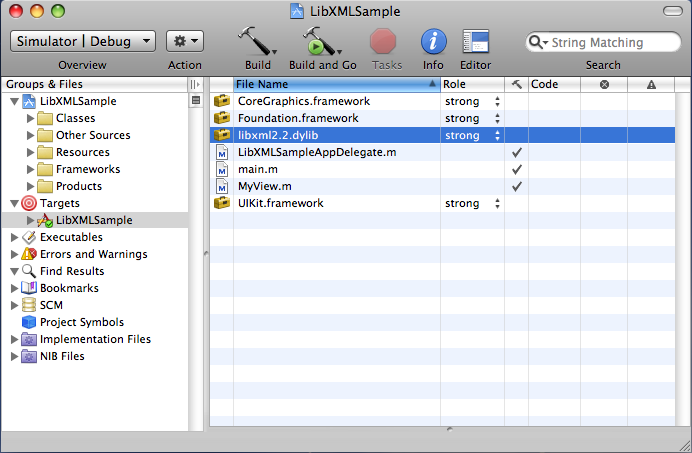 was added by my project wasn’t compiling! It still couldn’t find the proper header files for libXML, even though it was listed as a framework right here!
3. The not-so-obvious step is to add the libXML header files to the header search path in the build properties. To do this, expand the Targets node of your project, and right click your project target file and Get Info. 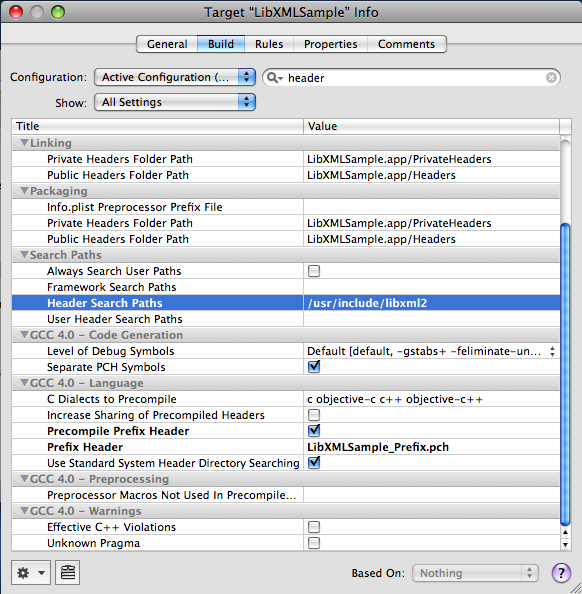 Then add “/usr/include/libxml2” to the header search path in target build settings.
Now compile, and everything should be compiling just fine! You can download the final LibXMLSample project here.
Hahaha, The Google.
Yep almost 3 years later…
Just wanted to say I was scouring “The Google” and found your tutorial. You wouldn’t BELIEVE how hard it is to find a spoon-fed tutorial like this for newbies such as myself.
Many thanks!
Thanks a lot, i find the solution for my problem with libxml2 🙂
This worked. Thanks so much!
I was looking for this solution for days. Google, forums, blogs so many places I have searched for a solution. none of them really worked.
You are the best. This is working perfectly. Thanks
Adam.
When I deleted Xcode 3 and installed Xcode 4 then /usr/include/libxml2 was not available anymore.
I found it here:
/Xcode4/Platforms/iPhoneOS.platform/Developer/SDKs/iPhoneOS4.0.sdk/usr/include/libxml2
use this
${SDK_DIR}/usr/include/libxml2
for any version of xcode, including xcode 4
Thanks for the tip!Really helped me out.
Thanks man it really works after 2 days trial and errors